I run six or seven projects at any given time. Each one has at least one AI agent running in a terminal: Claude Code, sometimes Aider, sometimes something else. They read files, write code, run tests, ask me questions. All at once.
And I have no idea what any of them are doing.
The tools are happy to tell me. They were built, great tools, mind you, for a world where one person uses one terminal for one thing. That world ended about a year ago, and I still mostly pretend it didn't.
The Actual Problem
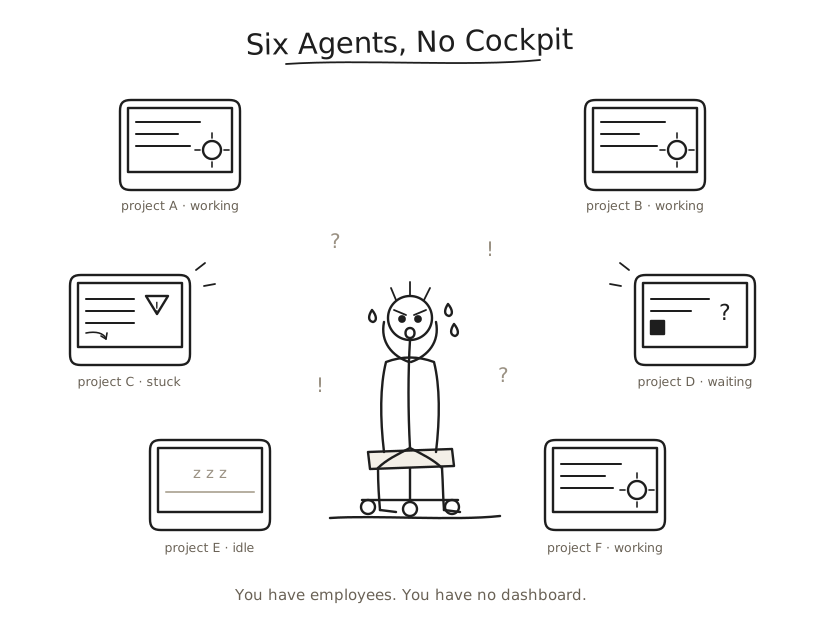
Here's a typical afternoon. Claude Code is refactoring authentication in project A. Another instance is writing tests in project B. A third hit a compilation error in project C ten minutes ago and is stuck in a retry loop, which I have no way of knowing because it's on a different desktop. Project D's agent finished twelve minutes ago and is waiting for my approval. I'll find out when I eventually Cmd+Tab over and see the prompt blinking at me.
Spend a day like this and the word that surfaces is trust. I let these agents edit auth middleware and rewrite tests, and my only evidence that any of it went well is a wall of scrollback I will never read. I cannot hold a fleet to a reliability bar I have no way of measuring, so I cycle through a grid of desktops like a security guard checking monitors and call that supervision.
Why Terminals Don't Know
Ghostty is excellent. Fast, GPU-accelerated, beautiful. But it renders characters on a screen, which is all a terminal does. It has no way to know the characters scrolling past are an AI agent editing your authentication middleware.
tmux gives you panes. Split, resize, scroll. It's a spatial organizer for text streams, blind to which pane is stuck and which is waiting for input. It shows the same green bar regardless.
The tools that try to fix this (Claude Squad, Agent Deck) are tmux wrappers. They manage processes while still treating agents as opaque text streams, and they look like 1997.
The gap is one of perspective. These tools watch terminals when the thing you need to account for is an agent: what it touched, what it claimed, whether it should have stopped.
A Watcher That Stays Behind the Glass
So the missing piece has a shape. Call it a cockpit: mission control for the fleet of agents now living on your machine.
The core idea is one sentence: show me what all my agents are doing without touching any of them.
That constraint carries the whole design. The moment the watcher can also act, its record stops being trustworthy, because now it's a participant covering for itself. The agent works. I supervise. The cockpit stays the glass between me and the factory floor, a pane I read through while my hands stay off the work.
Every time I'm tempted by a "smart" feature (auto-approve safe operations, chain agents together, pre-fill responses) I ask one question: would a good mission control operator want the console to start pressing buttons on its own? The answer is always no. A console that flies the craft can no longer be believed about the flight.
Reading the Room
For a cockpit to be useful it has to understand what it's looking at, and the surprising part is how little that takes.
Four states are enough. Inactive, working, needs input, error. That's the whole vocabulary. At a glance you know which agent is thinking and which one has gone quiet waiting on you, and seeing those states across every project changes the whole experience.
You can get there without an LLM. Pattern-matching the terminal output is enough, and it's instant. The agent is "working" when output streams, "needs input" when it asks and goes quiet, in "error" when the same failure repeats. A loop is just the same error three times in a row.
Once you have states, you want a narrative. "Working" becomes "Editing auth module, 8 files, 2m." "Error" becomes "Stuck: compile error (5x, 3m)." The raw state tells you the color. The narrative is the first line of an audit trail, the thing you read back later to decide whether the run can be trusted.
The Activity Stream
The feature I want most is the one I never find: a structured timeline of everything every agent did. Files created, commands run, errors hit, tasks completed, sub-agents spawned. Across all projects.
The real question, the one I ask twenty times a day, is "wait, what did the agent in project C do while I was on project A?" The answer is always the same: scroll up, read a wall of text, reconstruct it yourself. That reconstruction is the provenance question I chase in my eval work, where the test asks whether an agent can point to the source it used. A claim with no lineage is one you take on faith, and faith does not scale to seven terminals.
A cockpit should do that reconstruction for you, passively, with no cooperation from the agent: watch the output, extract the structure, keep the log. The log is the artifact. When something ships that shouldn't have, it tells you which agent, which command, and where it should have asked instead of guessing.
The Brain and the Window
I built a version of this for myself: a native app, a window with every project in a grid. It worked, and using it taught me the thing I didn't expect.
The valuable part turned out to be what ran behind the window: the pattern matching, the state detection, the event extraction. The window was just one way to read what that layer already knew.
So the cockpit is two things pretending to be one: an intelligence layer that watches and understands, and a rendering layer that shows it to you. Separate them and the watcher becomes the asset: a record that survives the window is one you can replay, diff, and audit after the fact.
When observation lives inside a GUI, it only happens while the GUI is open, which leaves holes in the audit trail exactly where you looked away. Pull it out into something always-on, infrastructure on the order of a database, and observation becomes continuous. The screen is one client among many: a dashboard, a script, a notification, even another agent can read the same stream.
A good mission control room keeps recording whether or not anyone is watching the screens. The instruments are the real system, and the screens are a convenience.
So What?
Running this many agents turns you into the supervisor of a small workforce you can barely see. The cockpit is the layer that makes the job honest work instead of guesswork, and right now it mostly doesn't exist.
Sitting with the problem taught me where the difficulty lives. Agents are easy to run. We have no shared vocabulary for what holding them to account looks like, so we borrow from DevOps (monitoring, orchestration), from management theory (delegation, oversight), from UX (dashboards, notifications), and every loan fits a little wrong.
This is a new kind of work that sits between coding and managing and has no name yet. You're reading output, judging quality, deciding priorities across domains, all while the agents type. The judgment you can't outsource is the same one that matters in evals: when the output earns your trust, and when the honest answer was "I don't know".
The cockpit is still missing. People are building it now, myself included, in the open. I don't think it ends as an app. It ends as a layer: always-on, observing, indifferent to how you choose to look at it. Observability is the precondition for every reliability claim you might make about a fleet, because you cannot hold an agent to a standard you have no record of. The window is the easy part. The instruments are the work.
*I still run agents in parallel every day and cycle through desktops more than I'd like, and I'm honestly not sure yet whether the cockpit is a product or a daemon I'll keep to myself.*